
Getting Organized
We acquire stuff. And at times throughout our lives, we let some of it go. The stuff we keep has meaning for us. You might have a collection that you or a parent/grandparent started years ago and you continue to enjoy adding to it. Or a rocking chair that has rocked many a family baby to sleep and has become precious for that reason. You may be the current keeper of the trunk that your great-great grandmother brought with her from the old country. Whatever you have that you don't want to end up in resale shop, or end up in the landfill, or end up in a stranger's home belongs here in Family Treasures.
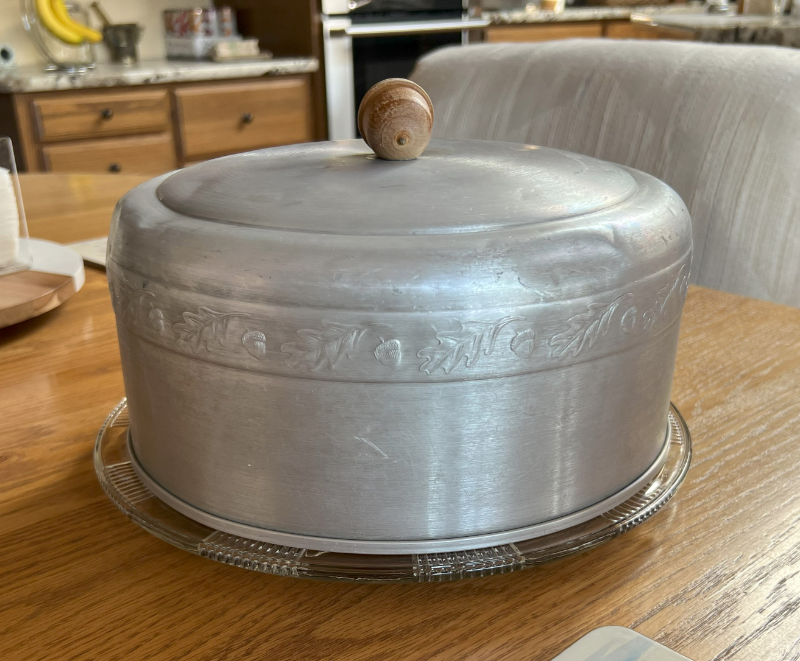
A few weeks ago, I had a layered cake (most of the cakes I make are in sheet pans) and got out my mother’s glass plate and aluminum cover for the cake. One of our family members had not seen it before and I told her that it belonged to my mother and that I think was a wedding gift. And that would have been in September 1950. Her response was “Wow that’s old and I’ve never seen anything like that!”. I hadn't even thought of this cake stand and cover as a treasure before but now it falls into my second category of "stuff I hope someone could use or want". I'll add it to my treasure trove and see if my daughter wants it. My first category are for the items that definitely need to stay and the third category for the items I don't have any attachment to but maybe someone could use.
After creating an account here, click on subscribe and try out our service for free for sixty days. You may have already taken pictures of your treasures but you don't need to identify everything first to get started.
- Once you have made an account and subscribed, open a browser (Chrome or Edge is recommended) on your smart phone. Type Family-Treasures.net into the address bar and enter. Our website is mobile friendly and looks very similar to the PC version. You can use a tablet also such as an iPad or Amazon Fire.
- Click on Trove List located on the left-side, grey ribbon menu. In your trove, you can start adding treasures by clicking on "+Add Treasure" on the left-side grey menu.
- Click add a photo then click on "Choose files". Three options will appear: Photo Library, Take Photo and Choose Files. If you are going to use your phone camera, choose "Take Photo".
- Once the photo appears, you can change the orientation by clicking on the three small dots in a grey box located on the top-right corner of the photo. Then scroll down and fill out the details such as name and background.
- When you're ready to move on (and you can always come back to any treasure and add more information later) click on the save icon on the left, grey menu ribbon. Always do this before you leave a treasure or memory after modifying any information about it.
- In the drop down menu, you will see the additional services for your trove. Memories, Discussions, Family Records and Trove Details. As the sponsor/owner, you choose how to categorize and keep track of values of your treasures and manage the members for your trove. When you add a member, you choose their role in the trove and send them an email invitation to join you.